
Free template for training leads, HR and program directors
DSP annual training plan template
A free spreadsheet and printable PDF to plan a year of direct support professional (DSP) training, starting from your state’s rule: month-by-month topics built on the NADSP Competency Areas, with hours, delivery mode and who attends, and a staff roster that tracks each person’s early-training due date and yearly hours.
Special Learning · November 15, 2026
Free download
Download the template
Short answer
What goes in a DSP annual training plan?
Updated
Your state’s rule first, then the competencies. Each state sets DSP training in its own rules. For Medicaid waiver services, the state must assure CMS of “[a]dequate standards for all types of providers that provide services under the waiver” (42 CFR 441.302(a)(1)). The training rules differ: of the 51 state rules we read on November 15, 2026, 15 set a number of training hours every year (state finder).
So a plan starts with what your rule requires: training due before or early in a DSP’s work, any yearly hours, and any curriculum it names. Then it maps a year of topics to the published DSP competencies, sets the hours, delivery mode, trainer and audience for each, and tracks every person against the rule. The template holds all four, with the cells for your rule’s numbers left blank for you to fill.
Inside the template
Three sheets, with the math done for you
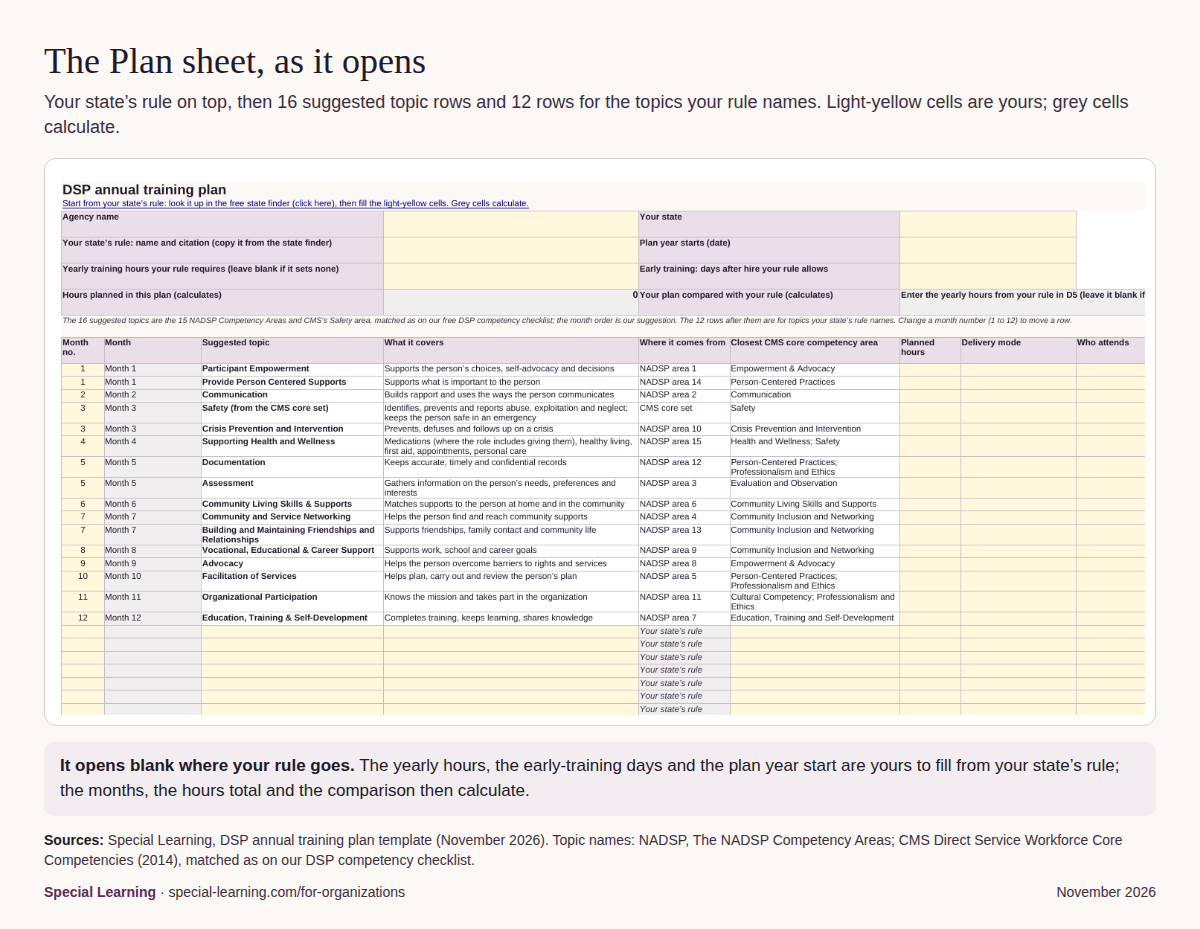
- Plan. Your state’s rule on top: state, the rule’s name and citation, the plan year start, the yearly hours it requires and the days after hire it allows for early training. Below it, 16 suggested topic rows and 12 rows for the topics your rule names, each with planned hours, delivery mode, who attends, trainer or lead, whether your rule requires it, a date and a status. The sheet adds up the hours you plan and tells you how many more you need to reach the number you entered.
- Staff roster tracker. One row per person, for up to 200 staff. Enter a hire date and the template works out the early-training due date; enter the date they finished and the hours completed, and it shows whether early training is Due, Overdue, Done on time or Done after due date, and whether yearly hours are On pace, Behind pace, Met, In progress or Not met by year end. Where your rule sets different hours for some staff, such as part-time staff, enter that person’s hours in their own column.
- Instructions. The six steps below, what each sheet does, and where the topics come from.
The roster’s one example row uses a real rule so you can see the formulas work: 24 hours a year for direct service professionals, Pennsylvania’s figure as our finder records it (55 Pa. Code §§ 6100.141-6100.143). Delete it and use your own state’s rule.


The topics
16 suggested topics, built on the DSP competencies
The suggested rows are the 15 NADSP Competency Areas, named as NADSP publishes them (NADSP), plus the Safety area of the CMS Direct Service Workforce Core Competencies, which covers recognizing and reporting abuse, neglect and exploitation as an area of its own (CMS, 2014). Each NADSP area sits beside the closest CMS area, matched as on our free DSP competency observation checklist. CMS says its set “may be customized in practice to reflect the specific needs of people supported” (CMS, 2014), and the order here is only our suggestion. Area 9 matters most where the role includes job or school supports, and the medication part of area 15 applies only where the role includes giving medications.
| Month | Suggested topic | What it covers | Where it comes from | Closest CMS core competency area |
|---|---|---|---|---|
| 1 | Participant Empowerment | Supports the person’s choices, self-advocacy and decisions | NADSP area 1 | Empowerment & Advocacy |
| 1 | Provide Person Centered Supports | Supports what is important to the person | NADSP area 14 | Person-Centered Practices |
| 2 | Communication | Builds rapport and uses the ways the person communicates | NADSP area 2 | Communication |
| 3 | Safety (from the CMS core set) | Identifies, prevents and reports abuse, exploitation and neglect; keeps the person safe in an emergency | CMS core set | Safety |
| 3 | Crisis Prevention and Intervention | Prevents, defuses and follows up on a crisis | NADSP area 10 | Crisis Prevention and Intervention |
| 4 | Supporting Health and Wellness | Medications (where the role includes giving them), healthy living, first aid, appointments, personal care | NADSP area 15 | Health and Wellness; Safety |
| 5 | Documentation | Keeps accurate, timely and confidential records | NADSP area 12 | Person-Centered Practices; Professionalism and Ethics |
| 5 | Assessment | Gathers information on the person’s needs, preferences and interests | NADSP area 3 | Evaluation and Observation |
| 6 | Community Living Skills & Supports | Matches supports to the person at home and in the community | NADSP area 6 | Community Living Skills and Supports |
| 7 | Community and Service Networking | Helps the person find and reach community supports | NADSP area 4 | Community Inclusion and Networking |
| 7 | Building and Maintaining Friendships and Relationships | Supports friendships, family contact and community life | NADSP area 13 | Community Inclusion and Networking |
| 8 | Vocational, Educational & Career Support | Supports work, school and career goals | NADSP area 9 | Community Inclusion and Networking |
| 9 | Advocacy | Helps the person overcome barriers to rights and services | NADSP area 8 | Empowerment & Advocacy |
| 10 | Facilitation of Services | Helps plan, carry out and review the person’s plan | NADSP area 5 | Person-Centered Practices; Professionalism and Ethics |
| 11 | Organizational Participation | Knows the mission and takes part in the organization | NADSP area 11 | Cultural Competency; Professionalism and Ethics |
| 12 | Education, Training & Self-Development | Completes training, keeps learning, shares knowledge | NADSP area 7 | Education, Training and Self-Development |

How to
How to build your plan, in six steps
- Look up your state’s rule. Open the free state finder, find your state, and note three things: what is due before or early in a DSP’s work, any yearly hours, and any curriculum the state names or approves.
- Enter your rule at the top of the plan. Write in your agency and state, the rule’s name and citation, the date your plan year starts, the yearly hours your rule requires (leave it blank if it sets none) and the days after hire it allows for early training. These cells start blank on purpose.
- Add the topics your rule names. Use the blank rows under the 16 suggested topics for each topic your state’s rule lists, and mark them as required by your rule.
- Fit the 16 suggested topics to your year. Change a row’s month number to move it, delete what your roles don’t use, and fill in hours, delivery mode, who attends and who leads each one. In the spreadsheet, the hours planned add up at the top.
- List your staff on the roster. In the spreadsheet, first delete the blue example row (delete the whole row, not just its contents, so no formulas are lost). Then add one row per person: hire date, the date they finished early training, and the hours they have completed. The due dates and the status columns then calculate.
- Review it every month. Sort or filter the roster by status to see who is overdue or behind pace, schedule the next sessions, and keep each completed record under your agency’s records policy.

On paper
Prefer paper? Print the PDF
The printable PDF carries the same plan for a supervisor’s binder or a planning meeting: write-in lines for your state’s rule, the 16 topics with 6 blank rows for your own, a staff roster page, and the six steps with their sources. For an observation on shift, pair it with the DSP competency checklist.

Questions
DSP annual training plans: common questions
How many training hours does a DSP need each year?
It depends on your state, and sometimes on the service, the role, or whether the person works full or part time. Some state rules set yearly hours and others set none: of the 51 state rules we read on November 15, 2026 (50 states and DC), 15 set a number of training hours every year. Look up yours in the state DSP training finder and enter it in the template’s Plan sheet.
Does the template fill in my state’s requirement for me?
No. The cells for your rule’s yearly hours and early-training days start blank, because each state writes its own rule and rules change. The state finder links the primary rule for all 50 states and DC, read November 15, 2026; open yours, then copy its numbers and named topics into the template.
Does it work in Google Sheets and Excel?
It is built to. It is a standard .xlsx file that uses only common functions that Excel, Google Sheets and LibreOffice all support (SUM, IF, OR, MAX, MIN, N, EDATE, TEXT and TODAY), with dropdown lists and conditional colors. We checked every formula by recalculating the file in LibreOffice. In Google Sheets, open it with File, Import, Upload.
What counts as a training hour?
Your state’s rule decides. Some rules say what does not count: Louisiana’s rule, for example, as our finder records it, says orientation and normal supervision don’t count toward its yearly hours (LAC 48:I.5055). Use the template’s Notes column to record how each session relates to your rule.
Did NADSP or CMS write this template?
No. The template, the short topic descriptions and the month order are Special Learning’s. The 15 competency area names are NADSP’s (NADSP), and the Safety area and the closest-area names are from the CMS core competency set (CMS, 2014). Neither organization has reviewed or endorsed the template.
Sources
Read November 15, 2026. The competency area names and the quoted lines are as published; the template, the topic descriptions and the month order are ours. Neither NADSP nor CMS has reviewed or endorsed this template.
- National Alliance for Direct Support Professionals (NADSP), The NADSP Competency Areas. https://nadsp.org/resources/competency-areas/
- Centers for Medicare & Medicaid Services (CMS), National Direct Service Workforce Resource Center, CMS Direct Service Workforce Core Competencies: Final Competency Set, December 2014. https://www.medicaid.gov/sites/default/files/2019-12/dsw-core-competencies-final-set-2014.pdf
- 42 CFR 441.302(a), State assurances for home and community-based services waivers: health and welfare. https://www.ecfr.gov/current/title-42/section-441.302
- 55 Pa. Code §§ 6100.141-6100.143 (Pennsylvania), training sections. Open § 6100.143
- La. Admin. Code tit. 48, Pt. I, § 5055 (Louisiana), direct care staff training. https://www.law.cornell.edu/regulations/louisiana/La-Admin-Code-tit-48-SS-I-5055
- Special Learning, state DSP training rule finder: the primary rules of all 50 states and DC, read November 15, 2026.
- Special Learning, DSP competency observation checklist: the 15 NADSP areas, each beside the closest CMS area.