
Free template for training leads, HR and program directors
Staff training sign-in sheet and training record template
A free in-service sign-in sheet and staff training record for providers that employ direct support professionals (DSPs): a spreadsheet that works out each person’s hours from their time in and out, keeps one training log for your whole team, and prints one person’s record on demand, plus a printable PDF for the session room.
Special Learning · November 15, 2026
Free download
Download the template
Short answer
What does a training sign-in sheet need to show?
Updated
What your state’s rule names, for every session and every person. Pennsylvania’s rule, for example: “Records of orientation and training, including the training source, content, dates, length of training, copies of certificates received and persons attending, shall be kept.” It adds: “The provider shall keep a training record for each person trained.” (55 Pa. Code § 6100.141)
Each state writes its own list. We read nine published lists of what training records must include, from seven states, the District of Columbia and OSHA, and built the sign-in sheet to hold every field in the table below: the session (title, type, what it covered, date, start and end time, length, location, trainer and their title, source), each person (name, job title, signature), the trainer’s signature, competency, and certificates. For Medicaid waiver services, federal rules ask each state to assure CMS of “Adequate standards for all types of providers that provide services under the waiver” (42 CFR 441.302(a)(1)); the details are each state’s. Look up yours in the free state finder.
The fields
Which published lists name each field
Each list below is that state’s or agency’s own, and each covers a particular kind of record, named in the sources. Nevada’s, for example: “Each employee, volunteer, subcontractor and intern has a training record that documents orientation and annual training attendance” (Nevada ADSD training standards). A list that doesn’t name a field may still ask for it elsewhere in the same rule.
| Field | Lists that name it | Their words |
|---|---|---|
| Training title or topic | 5 of 9 | |
| Type of training | 1 of 9 |
|
| What it covered (summary, objectives or agenda) | 6 of 9 | |
| Date | 8 of 9 | |
| Start and end time | 1 of 9 |
|
| Length in hours | 4 of 9 | |
| Trainer’s name | 7 of 9 |
|
| Trainer’s title or qualifications | 3 of 9 | |
| Trainer’s signature | 6 of 9 |
|
| Location | 1 of 9 |
|
| Training source or sponsor | 2 of 9 | |
| Each attendee’s name | 6 of 9 | |
| Each attendee’s job title | 1 of 9 |
|
| Each attendee’s signature | 6 of 9 | |
| Competency check | 2 of 9 | |
| Certificates | 3 of 9 | |
| Each person’s time in and time out | Ours | So someone who arrives late or leaves early is credited only the time they attended. Leave both blank and the spreadsheet credits the full session. With only one of the two times written, hours stay blank until both are. |
| Delivery mode | Ours | In person, on shift, live online, self-paced online or blended, so you can see how each hour was delivered. |
| Which rule it counts toward | Ours | Write in the rule, as your state’s rule names it. The template never fills this in for you. |

Beyond attendance
Signing in shows who attended. Some rules also ask what they learned.
Kentucky’s list for face-to-face training ends with “Verification of competency of the trainee as demonstrated by post-training assessments, competency checklists, or post-training observations and evaluations” (907 KAR 12:010). The District of Columbia, for training on one person’s support needs, asks for “a training attendance sheet signed by the person and by the trainer with written affirmation from the trainer(s) that the person has achieved the necessary level of competence” (DC DDS 2019-DDA-PROC-01). In Minnesota, the license holder determines competency through “knowledge testing or observed skill assessment conducted by the trainer or instructor” (Minn. Stat. § 245D.09). So the sign-in sheet has three columns the trainer fills in at the end: competency shown (Yes, Not yet or Not checked), how it was checked, and notes, and a trainer statement to sign. For a skills check on shift, use the free DSP competency observation checklist.
Inside the template
Five sheets, with the hours added up for you
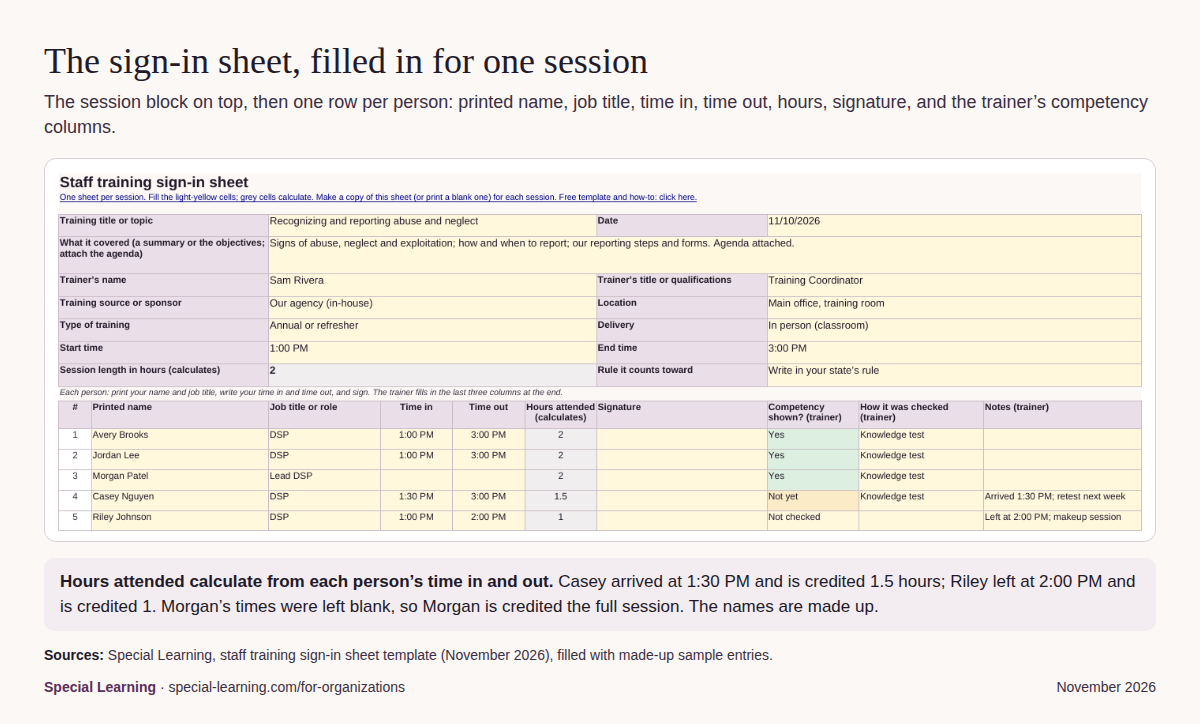
- Sign-in sheet. One per session. The session block on top, then 25 rows: printed name, job title, time in, time out, hours attended, signature, and the trainer’s three columns. Hours attended are time out minus time in; leave both blank and the person is credited the full session; with only one time written, hours stay blank until both are. The trainer signs at the foot. Copy the sheet for each new session.
- Training log. One row per person per session, for up to 1,000 rows, with the session details, hours, competency, certificate, the rule it counts toward and where the signed sheet is filed. Online courses and training from other providers go here too.
- Staff summary. One row per person, for up to 200 staff: sessions and total hours, hours this plan year, the yearly hours required, hours still needed, the last training date and a status. The plan year and the yearly hours start blank; copy them from your state’s rule.
- Staff training record. Choose a name and it fills in that person’s hours, status and up to 60 sessions from the log, ready to print for their file or a reviewer.
- Instructions. The six steps below, what each sheet does, and where the fields come from.


How to
How to run sign-in and training records, in six steps
- Look up what your rule asks a training record to show. Open the free state finder, find your state’s rule, and note what its training records must include, how long you keep them, and how online training is documented. The table on the template’s page shows what nine published lists name.
- Set up the workbook once. On the Staff summary sheet, enter your plan year start and the yearly hours your rule requires (leave it blank if it sets none), then list your staff. These cells start blank on purpose.
- Before each session, fill in the session block. Title, what it covers, date, start and end time, location, trainer and their title or qualifications, the training source and the rule it counts toward. Print the sign-in sheet, or use the PDF.
- At the session, everyone signs in. Each person prints their name and job title, writes their time in and out, and signs. At the end, the trainer checks competency the way your rule asks, marks each row, and signs the trainer statement.
- After the session, log it and file it. Enter one row per attendee on the Training log, file the signed sheet with any agenda and certificates, and note where it is filed. For online courses, file the certificate or transcript.
- Review it every month. The Staff summary shows each person’s hours this plan year and hours still needed. Print one person’s Staff training record whenever it is asked for, and keep records under your agency’s records policy and your rule.

Plan the year
Pair it with the annual training plan
This template records what happened. The free DSP annual training plan template plans what comes next: a month-by-month plan of topics, and a staff roster tracker that follows each person’s early-training due date and yearly hours. Copy each person’s hours this plan year from the Staff summary into the roster tracker’s column I, Hours completed this plan year.
On paper
Prefer paper? Print the PDF
The printable PDF carries the same sign-in sheet for a session room without a computer: the session block with write-in lines and tick boxes, 24 sign-in rows over two pages with the trainer statement, a one-person training record page, and the six steps with their sources.

Questions
Training sign-in sheets and records: common questions
What should a training sign-in sheet include?
Your state’s rule decides. In the nine published lists we read on November 15, 2026, the fields named most often were the date (8 of 9), the trainer’s name (7), what it covered, each attendee’s name, the trainer’s signature and each attendee’s signature (6 each), and the title or topic (5). This template has a place for every field in the table on this page; check your own rule in the state finder.
How long do we keep training records?
Your state’s rule and your agency’s records policy decide. Two examples from our sources: OSHA’s bloodborne pathogens standard says “Training records shall be maintained for 3 years from the date on which the training occurred.” (29 CFR 1910.1030(h)(2)); Florida’s handbook says the documentation for each classroom APD required training course is kept “by the trainer for a minimum of five years” (Florida iBudget Handbook).
How do we record online courses and training from another provider?
Log them on the Training log like any session, and file the proof your rule asks for. Florida’s handbook, for its required training: “If the training is Web-based, the only acceptable proof of the successful completion of required training or required pre-service training will be the printed certificate or transcript generated by the entity that provides the training.” (Florida iBudget Handbook). North Dakota: “If your agency accepts training completed at another agency, you MUST obtain copies of the training which includes the date, name of the training, the trainer’s name and the content of the course.” (ND PI 18-05). Minnesota: “The license holder must maintain documentation of the training received from other sources” (Minn. Stat. § 245D.09).
Can a person attest instead of signing?
West Virginia’s manual allows it. It asks for “the signature or attestation of the trainee” (WV BMS Manual 513.3.1). Others name a signature: New Jersey’s rule asks for “Documentation of attendance through a report that includes the dated signatures of the trainer and the trainee” (N.J.A.C. 10:44A-2.7). Follow your own rule.
Does it work in Google Sheets and Excel?
It is built to. It is a standard .xlsx file that uses only common functions that Excel, Google Sheets and LibreOffice all support (IF, AND, OR, NOT, ISNUMBER, N, SEARCH, DATE, SUM, SUMIF, SUMIFS, COUNTIF, COUNTA, INDEX, MATCH, IFERROR, SUMPRODUCT, MAX, MOD, ROUND, EDATE, TEXT and TODAY), with dropdown lists and conditional colors. We checked every formula by recalculating the file in LibreOffice. In Google Sheets, open it with File, Import, Upload.
Did any of these agencies write this template?
No. The template, its layout and its formulas are Special Learning’s. The field names come from the nine published lists named on this page, each quoted in its own words. None of those agencies has reviewed or endorsed the template.
Sources
Read November 15, 2026. Quoted lines are as published; the template, its layout and its formulas are ours. None of these agencies has reviewed or endorsed this template.
- PA: 55 Pa. Code § 6100.141 (Pennsylvania), Training records, records of orientation and training (55 Pa. Code § 6100.141(a)). https://www.pacodeandbulletin.gov/Display/pacode?file=/secure/pacode/data/055/chapter6100/s6100.141.html
- KY: 907 KAR 12:010, Section 3 (Kentucky), Supports for Community Living waiver provider requirements, documentation of all face-to-face training (907 KAR 12:010, Section 3). https://apps.legislature.ky.gov/law/kar/titles/907/012/010/
- WV: West Virginia Bureau for Medical Services Provider Manual, Chapter 513 (IDD Waiver), 513.3.1 Staff Training Documentation, effective August 1, 2026, training documentation for IDD Waiver staff (Manual 513.3.1). https://bms.wv.gov/media/41388/download?inline
- ND: North Dakota Department of Health & Human Services, Developmental Disabilities Section, Policy Issuance PI 18-05 (revised), Staff Training, November 18, 2025, documentation of all training and annual refresher courses (PI 18-05). https://www.nd.gov/dhs/policymanuals/816/Content/PI's/PI%2018-05%20%20DD%20training%20policy%20updated%2012%202025.pdf
- NV: Nevada Aging and Disability Services Division, Training Standards for Supported Living Arrangement Providers (exhibit filed with the Nevada Legislature, February 27, 2018), each person’s training record (ADSD standards, 2018). https://www.leg.state.nv.us/App/InterimCommittee/REL/Document/11554
- NJ: N.J. Admin. Code § 10:44A-2.7 (New Jersey), Staff training, training records’ documentation of attendance (N.J.A.C. 10:44A-2.7(e)). https://www.law.cornell.edu/regulations/new-jersey/N-J-A-C-10-44A-2-7
- FL: Florida Medicaid Developmental Disabilities Individual Budgeting Waiver Services Coverage and Limitations Handbook, May 2023, Appendix B, classroom in-service training documentation, and the daily sign-in sheet for APD required classroom courses (iBudget Handbook, Appendix B). https://www.flrules.org/gateway/readRefFile.asp?filename=iBudget%20Handbook%20with%20ADT%20Redesign%20working%20file%20changes%20post%20workshop%20v3%20CLEAN%20Final_revised%206.12.23.pdf&refId=15361
- DC: District of Columbia Department on Disability Services, Procedure 2019-DDA-PROC-01, Training, effective March 8, 2019, evidence of Phase III annual training, and records of Phase II training on one person’s support needs (2019-DDA-PROC-01). https://dds.dc.gov/sites/default/files/dc/sites/dds/publication/attachments/Training%20Procedure%203-8-2019%20%28Final%29.pdf
- OSHA: 29 CFR 1910.1030(h)(2), OSHA Bloodborne Pathogens standard, Training Records, bloodborne pathogens training records (29 CFR 1910.1030(h)(2)). https://www.ecfr.gov/current/title-29/section-1910.1030
- Minnesota Statutes § 245D.09, Staffing standards, subdivisions 3 and 5a. https://www.revisor.mn.gov/statutes/cite/245D.09
- 42 CFR 441.302(a), State assurances for home and community-based services waivers: health and welfare. https://www.ecfr.gov/current/title-42/section-441.302
- Special Learning, state DSP training rule finder: the primary rules of all 50 states and DC, read November 15, 2026.